 RowMinder
Your PDF pattern and row counter, on one screen
RowMinder is a workspace for crochet and knitting. Import the pattern you bought, slide a ruler along the row you are working on and tap +1. No switching between a PDF reader and a counter.
Coming soonApp StoreNo account. No ads. Works offline.
Made for working from your own patterns
Pattern and counters together
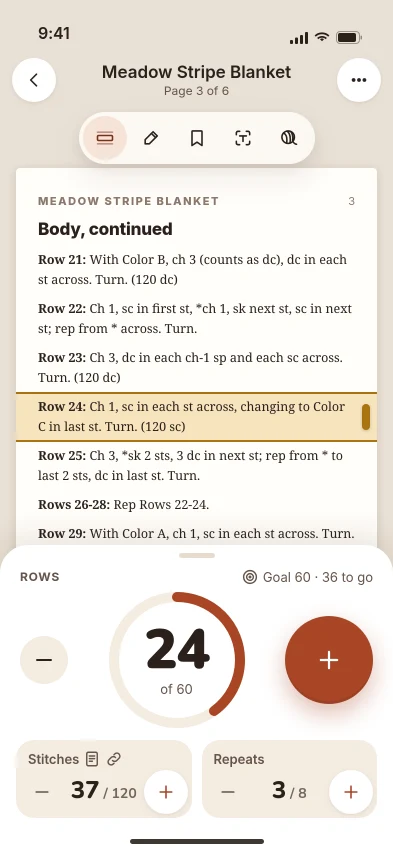
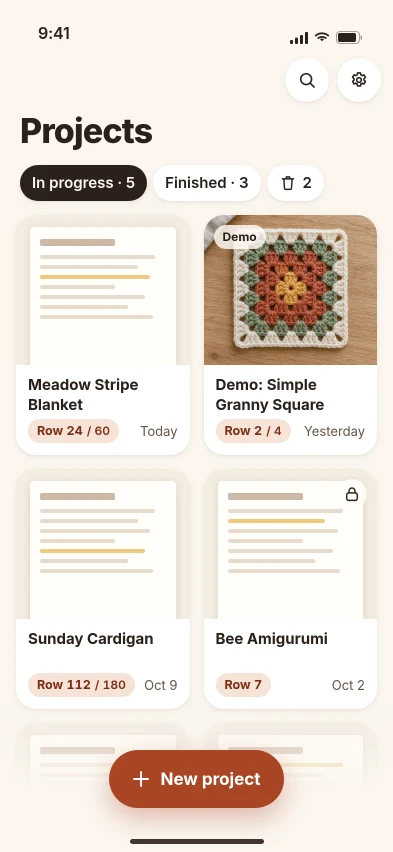
Import a PDF or a photo of a pattern from Files, Photos or the Share sheet. Your pattern and your counters share one screen. No catalog, no one else's content.
Row ruler
A highlighted band you drag along the pattern. It stays where you left it and is never locked behind a paywall.
Several counters (Pro)
Count rows, stitches and repeats, each linked to a pattern page. Big buttons, haptic feedback, goals and a history.
Find my row (Pro)
Text recognition runs on your device with Apple Vision and highlights the instruction for your current row. Your pattern is not uploaded.
Lock Screen, widget and Watch (Pro)
Add a row from the Lock Screen, the Live Activity, a widget or your Apple Watch without opening the app.
Also included: pen and notes on the pattern, bookmarks, a yarn log for each project, and backup to a file in Files or iCloud Drive so a new phone never means lost projects.
Questions
Do I need an account?
No. There is no sign-up and no server. Your patterns, notes and counters are stored on your device, and the app works offline.
What is free and what is Pro?
Free: one project, a row counter, the row ruler, markings and bookmarks, a yarn log and manual backup, with no ads. Pro adds unlimited projects, several counters, Find my row, Lock Screen, widget and Watch, and automatic backup. Pro costs $3.99 per month, $19.99 per year, or $39.99 once (lifetime). Prices are in US dollars; the App Store shows your local price.
Does RowMinder include patterns?
No. You bring your own PDFs and photos, for example patterns you bought on Etsy or Ravelry or got from a blog.
Does it work for knitting too?
Yes. Counters, the ruler and text recognition work for crochet and knitting patterns.
How do I cancel or restore a purchase?
Subscriptions are managed in your Apple ID settings, and purchases can be restored inside the app. See Support for the steps.